Click this to view or record information on prearranged bill rates with this client.
Client Bill Rate Grid
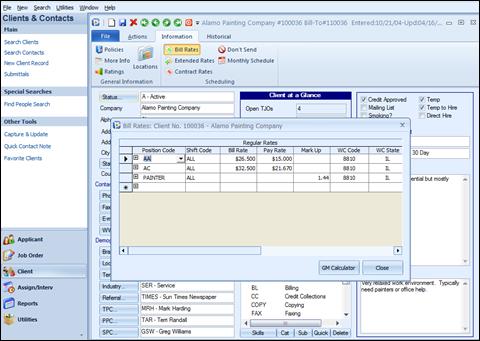
The screen contains the following fields in columnar format: Position Code, Shift Code, Bill Rate, Pay Rate, Mark Up, WC Code and WC State. The Workman’s Comp Code and State specified here will be used as the defaults for the specific position chosen on the Temp Job Order form. If not defined here, Ultra-Staff will look for worker’s comp in the Client Policy Screen. If not defined there, Ultra-Staff will look to the position defined in the Positions table. If no WC Code and State are listed in any of the above locations, blanks will be defaulted into the Temp Job Order.
Position Code: Position codes can be keyed in under the Position Code column or automatically selected from a list box in the Position Code field. To select from the list box, click in the Position Code field and then click on the pull-down arrow to display the list of position codes. To select a position, click to highlight the desired position and then click OK. You also may double click on the position to select it off of the displayed list. Press the TAB key to go to the Shift Code field.
Shift Code: Enter the Shift Code that will apply to the Position selected, and the Bill and Pay Rates listed. Use the selection button at the right of the field to select a code. ALL will default into this field. Use the TAB key to proceed to the Bill Rate field.
Bill Rate: Key in the bill rate that will apply to this position for this Client. You can leave this blank if you only want to carry over the pay rate or a special workman’s comp code for this position. Press the TAB key to go to the Pay Rate field.
Pay Rate: The rate employees will be paid who are assigned to this client as this position. You can leave this blank if you only want to carry over the bill rate or a special workman’s comp code for this position. Press the TAB key to go to the Mark Up field.
Mark Up: This field is used to calculate and populate the Bill Rate based on the Pay Rate and the entry in the Mark Up field. You can leave this blank if you do not want the system to calculate the Bill Rate for you. Press the TAB key to go to the WC Code field.
WC Code: Workman’s Comp Code. This is the worker’s compensation code that prevails for this position at this employer’s job site.
WC State: Workman’s Comp State. Used in conjunction with the above field, this field is used to associate a state with the WC code.
GM Calculator: This button allows the access to the add-on module, Profit Analyzer Module (Gross Margin Calculator). Refer to the section in this manual for details of this product.
Close: Exits the Bill Rate screen and saves any new or changed information. You may also close by clicking “X”, and you will be prompted for saving if new information was added.
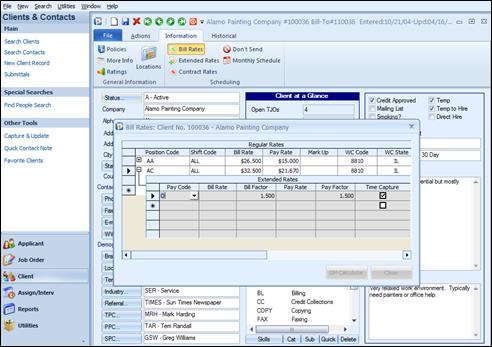
Ext Rates:
To the left of the Position Code, there is a  button, which activates the Extended
Rates. This feature allows special bill and pay rates to be applied to
selected pay codes. To close this window, click on the
button, which activates the Extended
Rates. This feature allows special bill and pay rates to be applied to
selected pay codes. To close this window, click on the  button found to the left of the Position
Code field. Extended Rates are fully explained in the following
section.
button found to the left of the Position
Code field. Extended Rates are fully explained in the following
section.
Client Bill Rates – Extended Rates