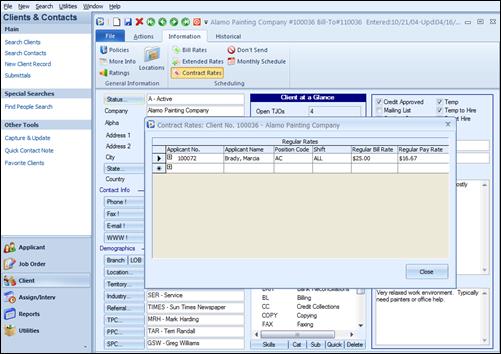
The Client Contract Rates program allows for the storing of Customer Contract Rates and Contract Extended Rates on a per-applicant basis.
When generating a new assignment record for a specific Applicant and a specific Position Code, Ultra-Staff will determine the Regular Bill Rate and Pay Rate that should be used as the ‘default’ on the Assignment window. Typically, the Job Order Bill / Pay Rate would be defaulted into the assignment, however they will be overridden by this Contract Bill / Pay Rate, if defined. When a specific Client Contract Bill Rate is found for the Applicant being assigned, that rate will override any Pay Rate already placed onto the Assignment record. The Customer Contract Pay / Bill Rate will also override, on the assignment, both the Applicant and Job Order Bill and Pay Rates, if they are defined.
Client Contract Rates form.
|
7 |
Select the Applicant Number, Position, Shift, and Regular
Bill and Pay rates for each applicant with a contract rate for the selected
client. Then, use the  to the
left of the Applicant No. field to access the Contract Extended Bill and Pay
Rates.
to the
left of the Applicant No. field to access the Contract Extended Bill and Pay
Rates.
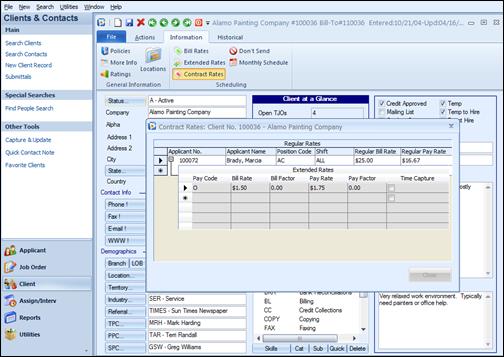
Contract Extended Rates from Client
When Contract Extended Bill and Pay Rates are found for the Applicant and the Position, that are found on the Assignment, it will override any existing Assignment Extended Bill and Pay Rates that may exist for this Applicant.
To close the Contract Extended Rates window, click on the
 found to the left of the Applicant
No. field.
found to the left of the Applicant
No. field.