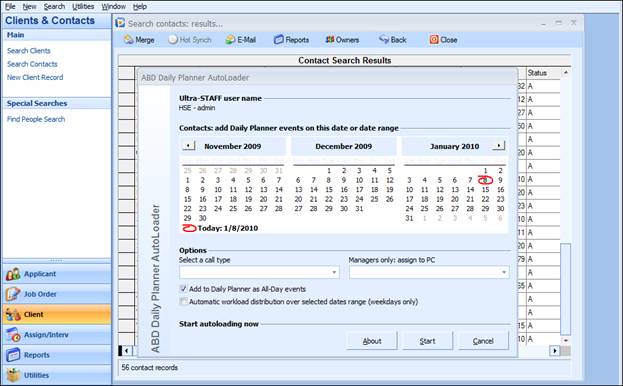
This utility will take items from an Applicant/Client/Client Contact search results list and add them to a users’ Daily Planner, for either a single date or spread across a range of dates. This is an invaluable tool, especially when reallocating customers and applicants within Ultra-Staff. This utility can be invoked by any user, which will allow for the items found to be added to that user’s Daily Planner. However, if invoked by the Ultra-Staff Administrator, the items can be added to any selected users’ Daily Planner. Because this utility is dependent on an Applicant/Client/Contact search result list, this will have to be present in the window before the utility can be accessed.
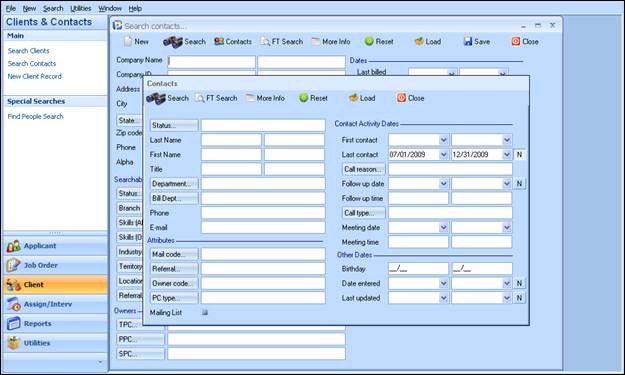
In the example shown below, all client contacts that have Not (the N button is depressed) been contacted between 7/1/09 and 12/31/09 will be searched, as they are persons that have not been contacted in a 6 month period and will need to be contacted.
Figure 2.2 – Client Contact Search Parameters
Choosing Search from this window will perform the search on the Client Contact data entered in the system, and with the search results up on the window, choosing Utilities, Daily Planner Loader, Contacts Loader. Depending on the Search Results on the window, the appropriate Loader options will become active.
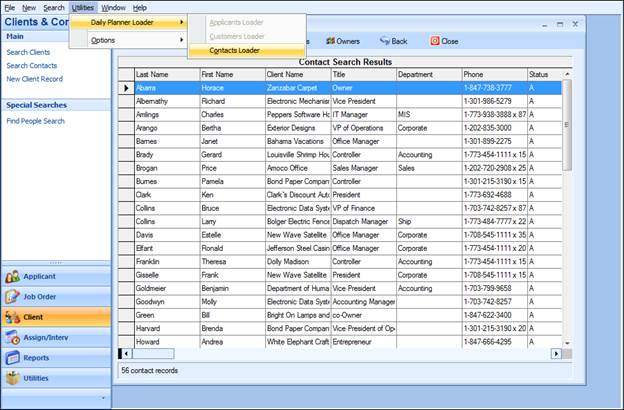
Figure 2.3 – Client Contact Daily Planner Loader
Once the Contacts Loader is selected, the following window is presented.