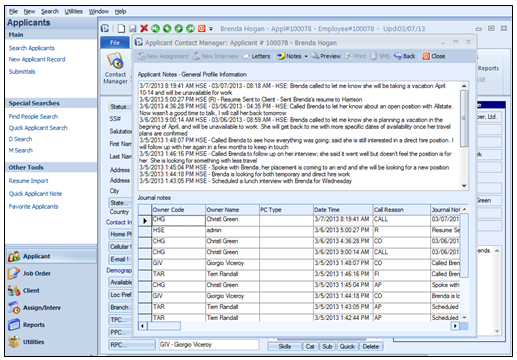
Accessed from the Notes option on the top of the Applicant Contact screen, the General Profile Information area displays information that is pertinent to the individual, whereas Journal Notes are sequential, dated notes that are specific to the applicant and to the individual owner of that applicant. Every time an Applicant Contact Owner alters the Last Result column, a new Journal Note is created. At the same time, and when set up, the content of the Last Result column is also saved in a new line in the General Profile. Journal Notes are permanent records and cannot be changed or deleted. General Profile Information and Journal Notes can be reviewed and printed together.
 Applicant Notes display with Split View
The General Profile Information is stored at the top of this form, and any text can be added or changed from here. As an option, Journal notes can automatically be repeated in the General Profile Information.
The Journal Notes, however, are read-only from this window. Information that appears has to be updated in the Last Results field from the Contact screen.
Following are additional options from the Notes option drop down list:
Max Profile: Displays a full-screen view of only the General Profile Information.
Max Journal Notes: Displays a full-screen view of only the Journal Notes.
Split View: Displays a combined view of the General Profile Information and the Journal Notes, as shown in the image above.
Filter Journal Notes: Use the Filter option to customize the information to be displayed in the Journal Notes. For example, if only the activity for one owner (PC) is to be viewed for a specific date range, this can be done through the Filter, as shown below.
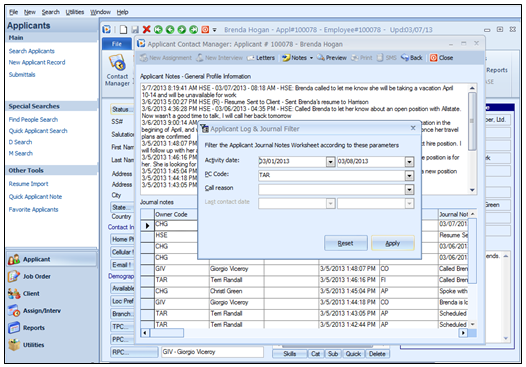
Applicant Notes and Journal Filter; Enter criteria to filter information
Enter in the search criteria desired, and when Apply is selected the results will appear. Click Reset to clear the search criteria fields.
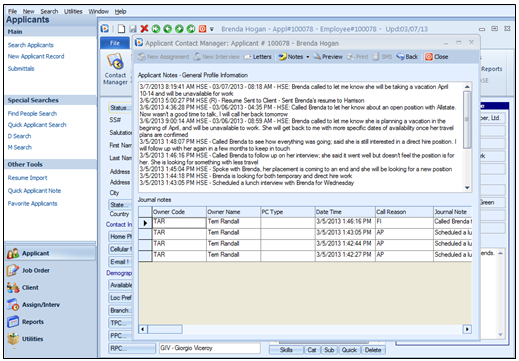
Results of the Journal notes filter
Preview: The Preview option is next to the Notes option. This provides a preview of both the General Profile and Journal Notes.
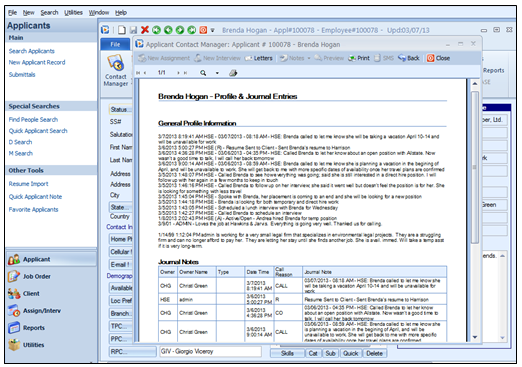
 Applicant Notes Preview The Preview
screen shows both the General Profile Information and the Journal Notes on a
read-only screen. There is no limit
to the amount of information and notes that the Preview screen can
display. If the content is longer than one page, use the arrows at the
lower left to scroll through all the pages. This is the ideal location to
print all notes relating to this Applicant.
Applicant Notes Preview The Preview
screen shows both the General Profile Information and the Journal Notes on a
read-only screen. There is no limit
to the amount of information and notes that the Preview screen can
display. If the content is longer than one page, use the arrows at the
lower left to scroll through all the pages. This is the ideal location to
print all notes relating to this Applicant.
Print: Once the preview window is open, the Print option becomes active on the top of the screen. Click this to print out the Profile and Journal Entries.
Back: By clicking Back, the screen will revert back to the previous screen.