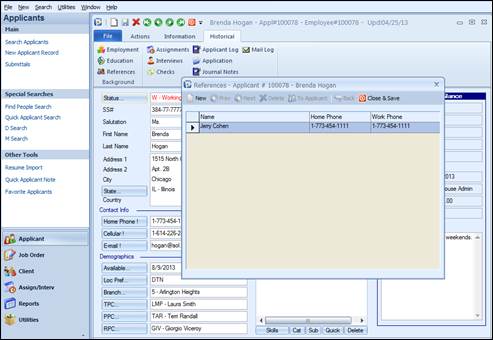
This is used to view or record the applicant’s personal reference information.
References listing
A list of personal references with the columns Name, Home Phone and Work Phone is displayed. Personal references can be called up by double clicking on the desired reference. To add a new personal reference from the list screen, click the New option. To Close & Save, click the Close & Save option.
When double clicking on a
reference, the following fields appear: 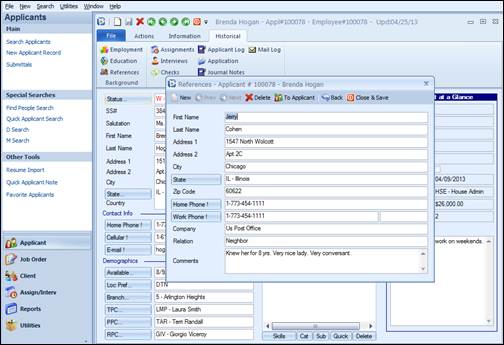
Individual reference screen
First Name: First name of the reference.
Last Name: Last name of the reference.
Address 1: The first line of address information for the reference.
Address 2: The second line of address information for the reference.
City: The city that the reference resides in.
State: The state that the reference resides in. Click the field label for ease of code selection via list view.
Zip Code: The zip code or postal code for the reference. This field allows for up to nine digits.
Home phone: The reference’s home phone number. It can be keyed in with area code and phone digits, and the system will automatically format it. If preferred, type in the phone with formatting. The field label is an action button which can be used for automatic dialing from the workstation. The workstation must be set up for auto dial in order to utilize this feature.
Work phone: The reference’s work phone number. It can be keyed in with area code and phone digits, and the system will automatically format it. If preferred, type in the phone with formatting. The field label is an action button which can be used for automatic dialing from the workstation. The workstation must be set up for auto dial in order to utilize this feature.
Next to the work number there is a field for an extension, if applicable.
Company: The employer that the reference works for.
Relation: The relationship the reference has to the applicant.
Comments: Comments regarding the reference.
The reference portion of Ultra-Staff can be an invaluable tool for the recruitment of applicants. Powerful information is resident within this section of the system.
Options on Top of References Screen:
New: Adds a new personal reference.
Prev: Retrieves the previous personal reference from the list.
Next: Retrieves the next reference in the list.
Delete: Removes a personal reference.
To Applicant: This options allows for “one touch” entry of a new applicant into Ultra-Staff from the Reference screen.
Back: Accesses the previous reference from the reference list.
Close & Save: Exits the Reference screen and saves any new or changed information. You may also close by clicking “X”, and you will be prompted for saving if new information was added.